Pixio XL Icon Pack4.2
Continue to app
Paid Version
Publisher Description


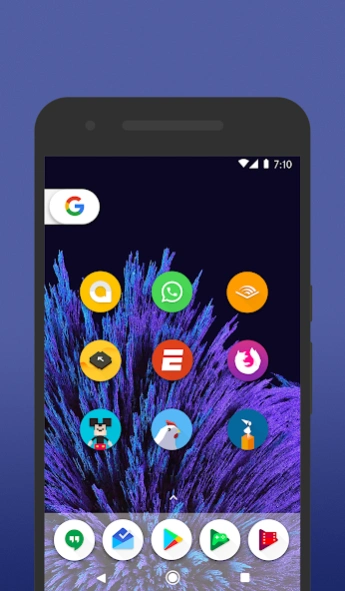
Simply and fresh design!
FEATURES・ 5300+ icons in full HD
・ Stock System icons for the most important producers like Samsung, HTC, LineageOS, Asus, Huawei, Leeco, LG, Meizu, Motorola, Oneplus, Sony, Xiaomi and many others
・ Alternative Colorful icons
・ Cloud wallpapers
(with Muzei support)
・ Dynamic calendar support
・ Search icons tool
・ Icons request tool
・ Weekly update
COMPATIBILITY
・ Custom Launchers
(Nova, Apex, Aviate, Action launcher, Lucid launcher, Go launcher, Holo launcher, Smart launcher, Everything Launcher, Adw launcher, Tsf shell)
・ Pixel launcher (modded version)
・ Lawnchair Launcher
・ Evie Launcher
・ Cyanogen theme engine (CM)
・ Unicon
· Xposed
・ Xgels
・ Beautiful Icon Styler
・ LG stock launcher
・ Asus stock launcher
・ Sony Xperia stock launcher
and many others…
INFO
This is not a standard application. In order to function you need a Custom Launcher
If your launcher isn't in the list inside the app you can apply it manually.
Go in the launcher settings then apply the pack!
WARNING
Pixel launcher does NOT support icon pack. You need to install a modded version
Google Now Launcher does NOT support icon packs
MIUI Launcher does NOT support icon packs
For Go Launcher Users: Currently Go Launcher does not support icon masking, so go to:
Preferences > Icons > show icon base (disable it)
MISSING ICONS
You are getting lost icons? Send me a request by the tool inside the app and change the email object in "Activity Request". I will fix it!
CONTACT
GooglePlus https://plus.google.com/+DevFraom
Facebook https://www.facebook.com/fraomdesign/
Twitter https://twitter.com/Fraom
About Pixio XL Icon Pack
Pixio XL Icon Pack is a paid app for Android published in the Themes & Wallpaper list of apps, part of Desktop.
The company that develops Pixio XL Icon Pack is Fraom Design. The latest version released by its developer is 4.2. This app was rated by 1 users of our site and has an average rating of 2.0.
To install Pixio XL Icon Pack on your Android device, just click the green Continue To App button above to start the installation process. The app is listed on our website since 2018-11-10 and was downloaded 15 times. We have already checked if the download link is safe, however for your own protection we recommend that you scan the downloaded app with your antivirus. Your antivirus may detect the Pixio XL Icon Pack as malware as malware if the download link to com.Fraom.OreoCircleIconPack is broken.
The company that develops Pixio XL Icon Pack is Fraom Design. The latest version released by its developer is 4.2. This app was rated by 1 users of our site and has an average rating of 2.0.
To install Pixio XL Icon Pack on your Android device, just click the green Continue To App button above to start the installation process. The app is listed on our website since 2018-11-10 and was downloaded 15 times. We have already checked if the download link is safe, however for your own protection we recommend that you scan the downloaded app with your antivirus. Your antivirus may detect the Pixio XL Icon Pack as malware as malware if the download link to com.Fraom.OreoCircleIconPack is broken.
How to install Pixio XL Icon Pack on your Android device:
- Click on the Continue To App button on our website. This will redirect you to Google Play.
- Once the Pixio XL Icon Pack is shown in the Google Play listing of your Android device, you can start its download and installation. Tap on the Install button located below the search bar and to the right of the app icon.
- A pop-up window with the permissions required by Pixio XL Icon Pack will be shown. Click on Accept to continue the process.
- Pixio XL Icon Pack will be downloaded onto your device, displaying a progress. Once the download completes, the installation will start and you'll get a notification after the installation is finished.
Program Details
System requirements
Operating systems
Android
Download information
File size
N/A
Total downloads
15
Pricing
License model
Paid
Price
Version History
Here you can find the changelog of Pixio XL Icon Pack since it was posted on our website on 2018-03-12. The latest version is 4.2 and it was updated on Soft112 on 10 October, 2026. See below the changes in each version:
version 4.2
posted on 2018-11-10
Added new icons
Fix a lot of missing icons
version 3
posted on 2018-03-11
Added 22 new icons
Fix missing icons
Restyling some G apps
